Bulk Downloader
Paste links from multiple websites and download them all with one click — streamline your workflow and boost productivity.
Download for Windows
For Win 10(64bit) / Win 11
Download For MacOS
For 10.15 or later
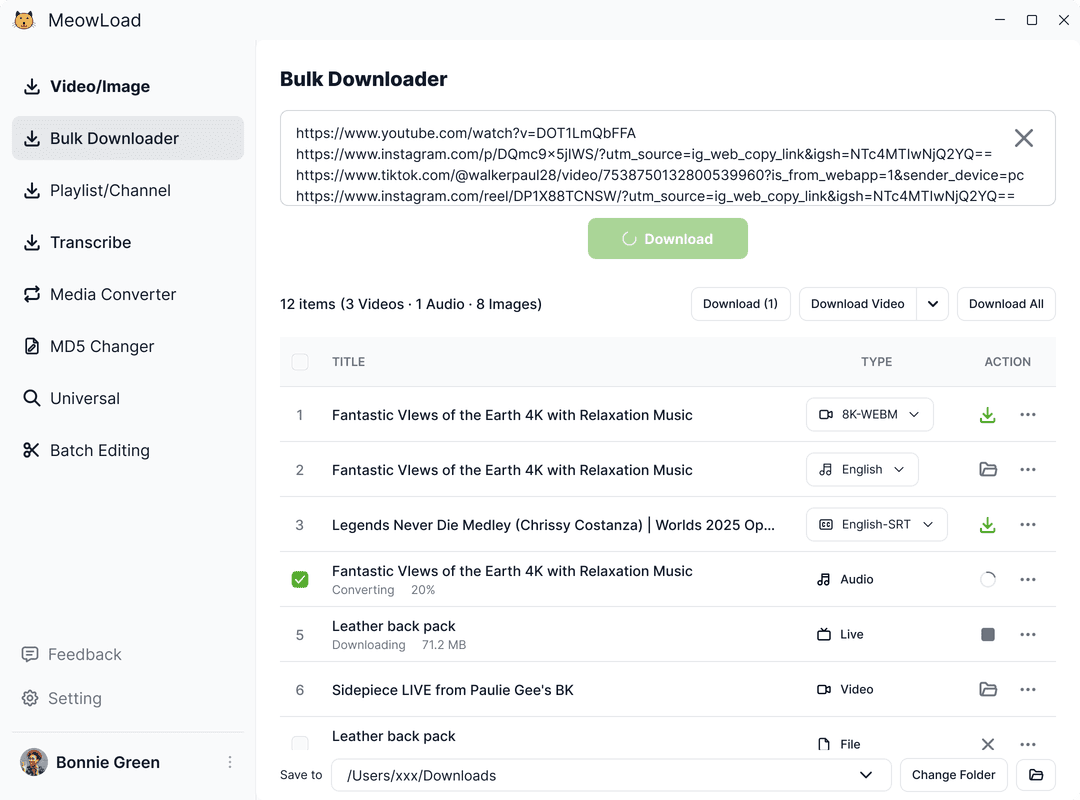
Unlock Full Features with the Desktop App
Enjoy batch downloads, universal resource detection, and advanced bulk editing for audio and video.
MoreSupports 900+ Websites
Download videos, images, and audio from over 900 popular sites like YouTube, X, Instagram, TikTok, VKontakte, Facebook, Bilibili, and more.
Ultra-HD Quality - Up to 8K Lossless
Automatically download the highest available resolution—8K, 4K, or 1080P. Ideal for professional editing, cinematic viewing, or any use where quality matters.
Playlist & Channel Bulk Downloads
Download entire playlists, channels, or hashtag collections from YouTube, Instagram, Twitter, TikTok, Bilibili, and more—all in one click.
Universal Media Downloader
Easily detect and download audio or video from any webpage using the built-in browser. Automatically scans content and supports bulk downloads with no extra steps.
Frequently Asked Questions
- Bulk Downloader supports the same 900+ platforms as our Video/Image Downloader, including popular sites like YouTube, TikTok, Twitter, Instagram, and more.
You can paste up to 30 links at a time. For best performance and stability, we recommend processing them in batches if you have more.
Yes! In the desktop client, you can select multiple items to download in bulk, or simply use the"Download All" button to save everything at once — quick and efficient.
- Verify your device meets the system requirements.
- Terminate conflicting background processes.
- Download and reinstall the latest client version.
- Contact support with error details for further assistance.